If you have a smart device or not you may have definitely heard of Angry Birds... Angry Birds is a popular and highly addictive game for the mobile devices. I played it on my iPhone (when it was with me) and was pretty much impressed with it. It was only playable on idevices, androids and some other handheld platforms. But now Angry Birds is available on PC!!! If you are using Google Chrome then head over to the Chrome Web Store and search for it.
Alternatively you can visit https://chrome.google.com/webstore/detail/aknpkdffaafgjchaibgeefbgmgeghloj directly and can install it on your chrome browser.
Or you can visit http://chrome.angrybirds.com/ from other browsers. (I have tried it on Firefox 4 and Opera 11 and it works fine on both of them.)
The game can be played in both HD and SD versions....
So, if you haven't played yet, then try it out now!!!!!!
Extra:
Want to unlock (or relock) all of the levels when playing Angry Birds in your favorite browser? Then use the following bits of code by pasting them into the Address Bar while the game is open and hit Enter.
Unlock the Levels
javascript: var i = 0; while (i<=69) { localStorage.setItem(‘level_star_’+i,’3′); i++; } window.location.reload();
Lock the Levels
javascript: var i = 0; while (i<=69) { localStorage.setItem(‘level_star_’+i,’-1′); i++; } window.location.reload();
Today when I opened
Blogger, I was surprised to see a pop-up that showed a new feature called views. With it Blogger has introduced 5 fresh alternate views that can be used to see the blog posts. This feature uses the latest web technology including AJAX, HTML & CSS3. According to the
post on Blogger Buzz, this is just a preview and we can soon be able to customize this views!!! Well, this had took Blogger much ahead of WordPress now. I personally prefer Blogger as it is more customizable, user friendly and easy than WordPress.
According to the
Blogger help centre article, following conditions must be satisfied to view your blog in different views:
Your blog must be public. Your readers don’t need to sign in to view your blog.
Your blog must have feeds fully enabled. In the Settings | Site feed tab, you have enabled either Full or Jump Break for your Post Feed.
You have not disabled dynamic views. In the Setting | Formatting tab, the option for Enable Dynamic Views is set to Yes. Click on the name of the view below to view this blog in different views:
- Flipcard
- Mosaic
- Sidebar
- Snapshot
- Timeslide
Here’s a snap how these views looks like:
Well, Where to report it now????? (Link)
Google is amazing (please thank me for this amazing revelation). There are some things you probably didn’t know Google can do. Take your time and read the information below. You’ll likely learn a few tips and tricks that will make you appreciate Google even more.
10. Find a beautiful wallpaper for your desktop resolution with Google images
Here’s how you do it:
As the number of your Facebook friends and apps you (and them) are using increases, your Facebook news feed and wall can turn into one big mess. It’s nice to communicate with your friends, but if you can’t find useful posts amidst all those silly apps, or your real friends amongst all the unknown people you’ve befriended, it’s time to clean up your Facebook profile. Facebook offers extensive options for fine tuning what individual applications and people can see or do on your Facebook profile, but if you haven’t been following all the changes (and Facebook likes to change often), you might feel lost in all the options. We’re offering a rundown of the most efficient ways to make more sense of your Facebook experience.
Scientists at ISRO built a gun specifically to launch standard 2-kg dead chickens at the windshields of airliners, military jets and the space shuttle, all traveling at maximum velocity. The idea is to simulate the frequent incidents of collisions with airborne fowl to test the strength of the windshields.
NASA engineers heard about the gun and were eager to test it on the windshields of their new high-speed trains. Arrangements were made and a gun was sent to the NASA.
When the gun was fired, the engineers stood shocked as the chicken hurled out of the barrel, crashed into the "shatterproof" shield, smashed it to smithereens, blasted through the control console, snapped the engineer's backrest in two, and embedded itself in the back wall of the cabin, like an arrow shot from a bow.
The horrified NASA engineers sent ISRO the disastrous results of the experiment, along with the designs of the windshield and begged the ISRO scientists for suggestions.
ISRO responded with a one-line memo: Defrost the chicken...
Google announced Google Buzz, its new social sharing feature for Gmail, company representatives admitted Buzz was inspired by a similar product: Google Wave. In fact, some of the features of Buzz and Wave are so similar you might be wondering why there are two different products in the first place?
Both services are supposed to help you create conversations and give you a richer experience around Web-based media like videos, images ,and regular text. But while Buzz and Wave have a lot in common, there also some key differences that set each service apart.

Wave and Buzz? What the heck are you talking about?
Google describes Wave as “an online tool for real-time communication and collaboration. A wave can be both a conversation and a document where people can discuss and work together using richly formatted text, photos, videos, maps, and more.” Basically, Google Wave is e-mail, instant messaging, an online collaboration tool and a wiki all rolled into one service.
But Google Buzz is designed solely to let you share videos, photos, links, and status updates with others just like you would on Facebook or Twitter. You can access Buzz through your Gmail inbox or through your mobile device’s Web browser.
Real-time communication versus e-mail conversation
While you will receive Buzz updates very quickly via e-mail, communication in Google Wave is much faster. Unlike Buzz, communication in Wave happens in real time, and you can actually watch someone typing out their response or comment on an individual wave. That’s a big difference, since it allows Wave users to easily collaborate on a project.
Wave is about collaboration, Buzz is about conversation
Wave was built on collaborative features like editing a document, planning an event, creating meeting notes, and so on. But if you just want to share photos, videos, or comments that don’t require real-time communication, then Google Buzz is probably the better option.
Waving is complex, Buzzing not so much
One of the problems with Wave is that it’s a difficult tool to explain to others, and once you understand what Wave is it’s even harder to understand everything you can do with it. Buzz, on the other hand, works similarly to e-mail and is focused on one thing: sharing content with others.
Buzz is a gateway to Wave
In a lot of ways, Buzz is a halfway point between regular e-mail and Wave. For example, when you get an updated Buzz in your inbox or Buzz tab, it displays the various comments and media that have been shared as a list. As the Buzz develops, that list gets updated and edited, but you only ever have one copy of an individual Buzz in your inbox.
Similarly, in Wave you only ever see one copy of an active wave, making it easier to track changes to a document or conversation. But new e-mail messages pile on top of one another, and it doesn’t take long before you end up with these massive conversation strings that are constantly being replicated every time you hit the reply button.
So my guess, as well as the guess of others, is that once you’re comfortable with Buzz, you might be more willing to use Wave for collaborative online projects. But the trick will be to get you to buy into using Google Buzz, and that may be a tough sell if you’re already used to sharing items with your existing networks on Facebook, MySpace, and Twitter.
Want to follow me on Buzz! Add me to your gmail buddy list: romilmars@gmail.com
Want a Google wave invite??? Mail me using your Google account...
A domain name is an alias for an IP address. Now what is an IP address? An IP address is a numeric code that signifies where to look through the Internet for content. An example of an IP address would be 22.226.141.25. Rather than typing in a long and easily forgotten IP address, a domain name helps you by typing an easily remembered name to access the same site.
For example, http://www.domainsatretail.com is a domain name that points to a specific IP address. People can remember a domain name such as http://www.domainsatretail.com much easier than they can a long numeric code.
In case of user password boot the pc in safemode by pressing the F8 key and then selecting the Safe Mode option. You can now logon as an administrator and XP wont prompt for the password. Incase of an administrator account try rebooting the pc in DOS. access C:\Windows\system32\config\sam . Rename SAM as SAM.mj
Now XP wont ask for password next time You Login. Also
Go to the cmd prompt .
Type net user *.
It will list all the users.
Again type net user "administrator" or the name of the administrator "name" *.
e.g.: net user aaaaaa *(where aaaaaa is the name).
It will ask for the password.
Type the password and there you are done.
Logging In As Administrator:
Hold the Ctrl-Alt key and press Del twice. This will bring up the normal login and you can log on as Administrator.
To unhide the Administrator account so it does show up:
Start Regedit
Go to HKEY_LOCAL_MACHINE \ SOFTWARE \ Microsoft \ Windows NT \ CurrentVersion \ Winlogon \ SpecialAccounts \ UserList
Unhide the Administrator key by giving it a value of 1
Those tech jargons confuse you often? You are not alone. A recent survey reveals that aimed at breaking the walls of `techno babble' shows that many technology words perplex users leaving them scratching their heads.
According to Alex Watson, editor of Custom PC magazine, a reason contributing towards the complexity of technology terms is that many companies tag different names on similar products, adding to the confusion. He says, "Some names are just made up for marketing purposes, while others are chosen so users can relate to the term."
The survey, conducted by Gadget Helpline, reveals Top 10 most confusing technological terms.
Dongle:
One of the commonly used word which often confuses many users is Dongle. A Dongle is like a small USB drive that connects to a computer to run a software in a secured manner. It is used as a high-end form of security to prevent the unauthorised copying of software.

If you want simple, no-nonsense directions, then MapQuest might be the best site for you. The website is very user-friendly and easy to use. On the other hand, the maps Google create can be easy as well, but there are many options for tinkering and having fun as well.
You can create your own one, browse other people's maps, change your driving direction route and take a virtual sightseeing tour in a faraway place, even Mars or the Moon! This is a map help guide for Google, showcasing a few of the hints, tips and tricks to making your mapping experience more enjoyable.
Many people are looking for map help to print or save their directions. The default print option is the step-by-step directions with a tiny one that is barely legible. For you map-mongers, you can get a larger full-size one by canceling out of the print dialog box (in Firefox), at which point a new window will pop up, allowing you to check a box that says "Show original map view."
The preview then changes to a full overview of street maps and driving directions, where you can modify the zoom level on your print window. When it comes to saving your directions, it may be surprising but you can't actually just save your driving directions map on the Google map site; you can save place-marks and maps but not the full shebang.
Instead, you have to click on and copy the link to the map (on the top right corner of the map that says "Link to this page"). If you save that link as a bookmark or in a Word document, then you will be able to access the exact same set of directions for next time.
Perhaps you need map help customizing your own map on Google. Did you know that you can change the place-mark icon? This can be very helpful if you are creating a map of your city or a road trip one that features several different kinds of places. For instance, you can use a comedy/tragedy mask icon for theaters, a martini glass icon for bars, a bed icon for hotels or a burger and shake icon for eateries.
Once you drag and drop the basic icon and place it on the map, you can click on it and select "Edit" to change your place-mark. Here you can also change the title that appears on it, the description and the icon (by clicking on the upper right-hand picture of the icon). The My Maps feature is pretty straightforward, but you can share yours with others by selecting "copy link location," emailing your map or embedding the map to your website or blog (by clicking on the "link text" button, copying and pasting the embedded link.)
Travelers often need map help finding notable landmarks. You may not necessarily know the address of the Eiffel Tower, but you can zero in on the location by typing in "Eiffel Tower." Now say you are in the car driving but you have no idea where you are.
You can turn your cell phone into a GPS device using Google Maps for Mobile right on your cell phone. (Check out the video for this on the Google Maps site). You may also want to explore the country of Japan to decide where you would like to visit, just by typing in "Japan." You can also search for zip codes, airport codes, latitudes and longitudes.
 A virus is known to many as an agent that causes different diseases. They have many modes of infecting all of the members of the animal kingdom. Although there are different types of viruses, they have one commonality; they are all harmful. Nowadays, the term virus has taken a different turn when it comes to the meaning. Now, it is more commonly associated with anything that brings a computer to its demise or to something close to that.
Computer virus has to be the most popular phrase when the thought of internet comes to the minds of most people. The reason is that they remember the destruction it brings. Computers have changed the way all people live. It has become important in all aspects of living may it be politics, religion or business. Just when we thought it could not get better, the Internet came along. Among all of the benefits of the internet, the one that people are most happy about is how it made communication much easier. In the old days, the only connection you have to your loved ones in other countries is through mail or telephone. Now, there are more efficient and faster ways of communicating. You can send an e-mail or a private message which will only take a few seconds and your message will be received immediately.
This advancement took a tragic turn when someone smart enough decided to make a computer virus. A computer virus, sticking to the true meaning of the word virus, is something that infects a computer, jams its programs and causes many problems to the user. It can bring any time of destruction from a small computer glitch to making your whole computer system crash.
Sadly, there are many ways that a virus is transferred from one computer to another. Storage devices such as USB can be a medium to transfer a virus. If two or more computers are connected via a network connection, a virus can be transferred. The most devastating news is that not only can it be transferred offline; it can be transferred online too. The internet became the most notorious aspect of the computer when it comes to getting it infected.
This is why the whole world, or the people who uses computers, rejoiced at the birth of antiviruses. These are the programs that are designed to track down and get rid of computer viruses from its system. Now, there are many ways on how to protect your computer using antiviruses. Although there are many antivirus programs out in the market today, they have one common factor: they prioritize prevention. They gave importance of detecting a virus that is threatening to invade a computer so that they can block it before it can cause any harm. Now, antiviruses are also wise enough to detect viruses that are already in the computer before they were installed and delete or clean it.
Aside from antiviruses, the users can also follow guidelines to prevent their computer from getting infected such as don't access sites that are about pornography since most viruses are found here.
When choosing from a vast majority of mobile phones available in the market, Nokia is a sure choice though there are many big names in the mobile phone market like Samsung, Sony Ericsson or LG to name a few. People can blindly rely on Nokia about the performance of their mobile phones. What are the top 10 Mobile Phones from their garage? Find out here.
1. Nokia E71

- Wireless Interface ; Infrared (IrDA), IEEE 802.11g, Bluetooth (A2DP), Bluetooth 2.0 EDR
- Integrated antenna
- Operating System : Symbian OS
- Camera Sensor Resolution 3.2 Megapixel , Still Image Resolutions : 2048 x 1536 ,Focus Adjustment : Automatic
- Video Recorder Resolutions : 640 x 480 (VGA)
- GPS System
- Display Resolution : 320 x 240 pixels
- Display Diagonal Size : 2.36″ with 16.7 million colors
- Battery : Rechargeable - lithium polymer, capacity - 1500 mAh, Up to 270 min talk, Up to 480 h standby, 4.4 oz
2. Nokia N85

- Wireless Interface : IEEE 802.11b, IEEE 802.11g, Bluetooth 2.0
- Camera Sensor Resolution : 5 Megapixel, CMOS Sensor, Auto Focus, LED light focus,Video Recorder Resolutions : 640 x 480 (VGA)
- Display Resolution : 320 x 240 pixels, Diagonal Size :2.4″ with 16.7 million colors
- Flash Memory : 8 GB - flash - microSD
- Battery Capacity : 1200 mAh with Talk time: up to 6.5 hours, Standby time: up to 363 hours
- Built-in GPS receiver, A-GPS function.
3. Nokia N96

- Wireless Interface : IEEE 802.11b, IEEE 802.11g, Bluetooth (A2DP), Bluetooth 2.0 EDR
- Operating System : Symbian OS
- Built-in User Memory 16 GB
- Camera Sensor Resolution : 5 Megapixel, Still Image Resolutions : 2592 x 1944, Auto Focus, Flash Light
- GPS satellite navigation
- 3G video calling
- Display Resolution 240 x 320 pixels, Diagonal Size : 2.8″, with 16.7 million colors
- Battery Capacity : 950 mAh,Talk Time Up to 220 min, Standby Time Up to 220 h
4. Nokia N95

- Wireless Interface : Infrared (IrDA), IEEE 802.11b, IEEE 802.11g, Bluetooth 2.0 EDR
- Operating System : Symbian OS 9.2 / Series 60 3.1 Edition
- Built-in User Memory : 8 GB
- Camera Sensor Resolution : 5 Megapixel CMOS Sensor, Still Image Resolutions : 2592 x 1944
- Video Recorder Resolutions : 640 x 480 (VGA)
- Display Resolution : 240 x 320 pixels, Diagonal Size : 2.8″ with 16.7 million colors
- Battery : Capacity : 1200 mAh, Talk Time Up to 300 min, Standby Time Up to 280 h
- GPS System
- Integrated antenna
5. Nokia 5800 Express Music

- First touchscreen phone of Nokia
- Display Type : TFT touchscreen, 16M colors, Size : 360 x 640 pixels, 3.2 inches
- Card slot microSD (TransFlash), up to 16GB, 8GB included
- WLAN Wi-Fi 802.11 b/g, UPnP technology
- Bluetooth v2.0 with A2DP
- 3.2 megapixel camera with Carl Zeiss Optics
- 3G Video calling
- An excellent web browser with support for Flash
- Music player & FM radio
- GPS positioning with Nokia Maps
6. Nokia N82

- Unlocked quad-band GSM cell phone compatible with 850/900/1800/1900 frequencies and International 3G compatibility via 2100 UMTS plus EDGE capabilities
- 5-megapixel digital camera with Carl Zeiss Optics, autofocus, digital zoom; DVD-quality video capture (640 x 480 pixels at 30 fps)
- Wi-Fi connectivity (802.11b/g); Bluetooth 2.0 connectivity for both handsfree communication and stereo music streaming
- Digital audio player; FM radio;
- MicroSD memory expansion;
- Access to email and instant messaging
- Up to 4.3 hours of talk time, up to 9.5 days) of standby time; backed by third party 1-year warranty
7. Nokia E75

- Display Type TFT, 16M colors, Size : 240 x 320 pixels, 2.4 inches
- QWERTY keyboard
- Features OS Symbian OS, S60 rel. 3.2
- Camera 3.2 MP, 2048×1536 pixels, autofocus, video (VGA), flash; secondary VGA videocall camera
- Bluetooth Yes, v2.0 with A2DP
- Battery Standard battery, Li-Ion 1000 mAh (BP-4L), Stand-by Up to 264 h, Talk time Up to 5.4 h
8. Nokia 6300

- 2 megapixel camera with 8x digital zoom,Video camera (176 x 144 pixels)
- Display: TFT, 16.7 million colours, 240 x 320 pixels (2 inches)
- FM stereo radio with Visual Radio
- Integrated loudspeaker
- Memory: 7.8 Mbytes plus microSD card slot (expandable up to 2 Gbytes)
- Connectivity: Bluetooth 2.0, USB
9. Nokia 3110

- Card slot microSD (TransFlash) upto 2GB
- FM stereo radio
- Display Type TFT, 256K colors Size 128 x 160 pixels
- HSCSD EDGE Class 10, 236.8 kbps
- Bluetooth v2.0, Infrared port
- USB v2.0 miniUSB
- Camera 1.3 MP, 1280 x 1024 pixels, video(QCIF)
10. Nokia 5200

- Wireless Interface : Bluetooth, Infrared (IrDA)
- Still Image Resolutions : 640 x 480, Digital Zoom : 4x
- Display Resolution : 128 x 160 pixels
- Color depth : 18-bit (262K Colors)
- MP3 player and stereo FM. MP3 ringing tones
A Sure Addition to this List : Nokia N97 (To Be Released...)

- High-Speed Data GPRS, Wi-Fi
- 5+ Megapixel Camera, A2DP, Bluetooth,
- Edge, Email Client, FM Radio
- GPS / Location,
- Memory Card Slot, MP3
- Qwerty Keyboard
- Smartphone, Speaker Phone,
- Symbian OS
- Touch Screen, Video Capture, Video Clip, Voice Dialing,
- Talk Time: Up to 6 hours 40 mins
- Stand By Time: Up to 430 hrs
Conclusion
With great power comes great responsibility. Being the largest mobile phone manfacturer, the responsibility is on their shoulder to provide their customers with more facility being creative and innovative as well.
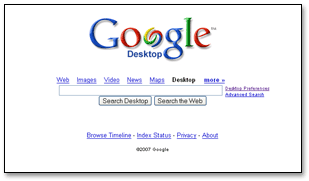
Google the ultimate search engine provides a useful software called 'Google Desktop-Search your own Computer...'
This software allows user to searc his/her own computer in a Google style!!!
It easily searches files, bookmarks and even your E-mails!!!
Moreover, Google Desktop creates cached copies (snapshots) of your files and other items each time that you view them and stores these copies on your computer's hard drive. As a result, you can often use Desktop to find items that you accide
ntally deleted, instead of having to recreate them from scratch.
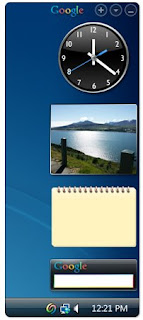
Also it comes with an attracting sidebar which includes exciting gadgets...
Though Windows Vista provides an inbuilt sidebar but Google Sidebar has its own fun...
It also comes with a feature to download new gadgets...

To download Google Desktop
Click here...To download Google Sidebar Gadgets
Click here...
*GOOGLE is a trademark of Google Inc.

After the successful launching of a brand new browser Chrome!, the no. 1 search engine has launched SMS channels for Indian users...
It is a new program by Google India...
Just sign up with ur google account and register ur mobile no. on google...
To view the Google SMS channel home page
click here...join the channel of your choice and receive SMS directly on ur cell phone...
It also allows users to create channels...
Moreover its feature of time preference of incoming messages and total messages per day is also very cool...
*GOOGLE is a trademark of Google Inc.


 Alternatively you can visit https://chrome.google.com/webstore/detail/aknpkdffaafgjchaibgeefbgmgeghloj directly and can install it on your chrome browser.